Complete Adobe Audition CC Course

Master audio editing with the Complete Adobe Audition CC Course, covering multitrack mixing, sound design, noise reduction, podcast production, and professional post-production techniques for polished, broadcast-quality audio projects.
Complete Adobe Audition CC Course
cpdacree aoth ukrlp 24hs fullonline 14days

Get access to 5000+ courses including this for only £49. Learn More.

Overview of Complete Adobe Audition CC Course

Master Adobe Audition with this practical course designed to build essential skills in audio editing, Audition CC, and sound editing. Learn how to record, edit, save, and export audio while developing efficient workflows for professional audio production and voice recording.

Explore multitrack sessions, audio mixing, music production, and advanced editing techniques using Adobe Audition. Learn to improve phone recordings, remove background noise, apply compression and equalisation, match loudness, and use effects such as delay, echo, pitch shifting, and fades.

Develop practical audio post-production skills by working with voice recordings, podcasts, music, and sound effects. The course covers spectral frequency editing, punch-and-roll recording, batch processing, time stretching, vocal effects, and creative sound manipulation, helping you produce cleaner, polished, professional-quality audio with confidence.

The course was audited and updated on: 5th August, 2026

Learning Outcomes of Complete Adobe Audition CC Course

Method Of Assessment​

Learners complete an assignment designed to evaluate their understanding of the course content. The assignment is reviewed by qualified tutors who provide personalised feedback, allowing learners to demonstrate their applied knowledge and skills.

Certification

one education Certificate

After completing the Complete Adobe Audition CC Course assessment, you will be eligible to receive a CPD-accredited certificate worth £9 from One Education to demonstrate your achievement.

The certificate is also available as a printed hard copy delivered by post for £15.

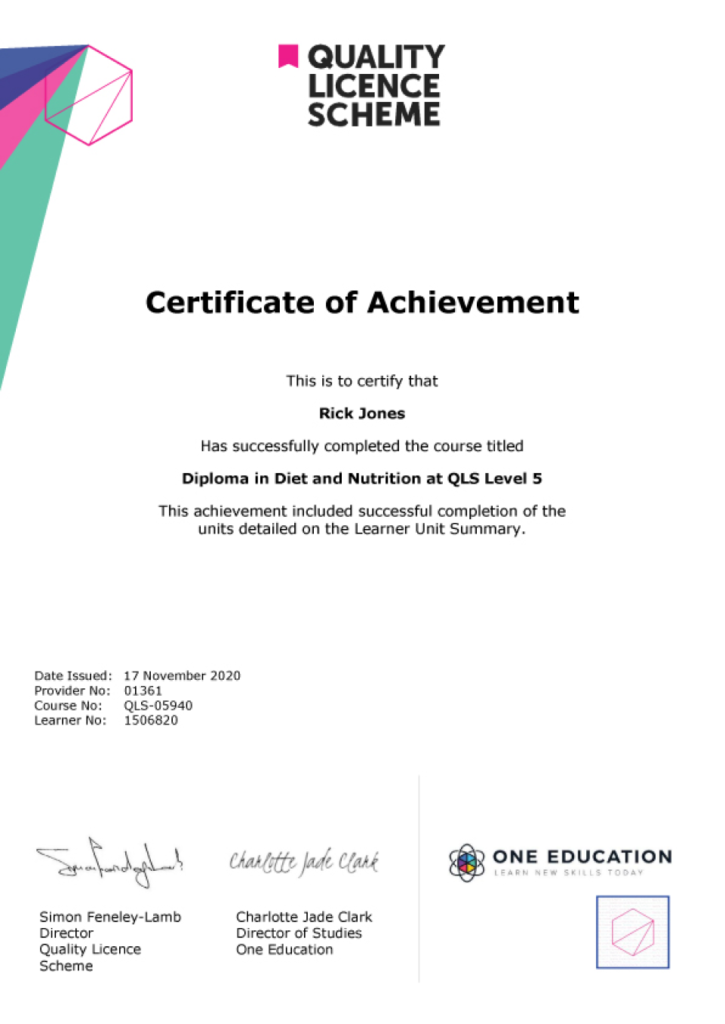
EXAMPLE - QLS Certificate 2020 1

Quality Licence Scheme Endorsed Certificate

Learners also have the option to order a Quality Licence Scheme (QLS) Endorsed Certificate as additional proof of achievement. The QLS Endorsed Certificate can be delivered by post for £79, with an additional £10 postage charge for international students.

Endorsement

This course has been endorsed by the Quality Licence Scheme for its high-quality, non-regulated provision and training programmes. This course is not regulated by Ofqual and is not an accredited qualification. Your training provider will be able to advise you on any further recognition, for example progression routes into further and/or higher education. For further information please visit the Learner FAQs on the Quality Licence Scheme website.

Why Study This Complete Adobe Audition CC Course?

Adobe Audition CC provides powerful tools for professional audio editing, recording, mixing, and sound production. Studying this course helps learners develop practical skills in audio enhancement, sound effects, noise reduction, voice recording, and post-production for high-quality audio content.

This course can strengthen audio production and editing capabilities for creative and professional projects. Learners can refine their mixing techniques, improve sound quality, and confidently work with voice recordings, music, podcasts, sound effects, and other digital audio productions.

Course Duration

The Complete Adobe Audition CC Course has a total study timeframe of 6 days, 5 hours. Learners can progress through the programme at a flexible pace, developing practical skills in Adobe Audition, audio editing, sound mixing, voice recording, music production, sound effects, audio restoration, and professional audio post-production workflows.

Requirements

The Complete Adobe Audition CC Course has no formal entry requirements, making it suitable for beginners and aspiring audio professionals. An interest in audio editing, sound recording, mixing, and music production is beneficial. Basic computer skills, good English, headphones or speakers, and reliable internet access are recommended for online learning.

Career Path

Frequently Asked Questions

1. What is the Complete Adobe Audition CC Course?
The Complete Adobe Audition CC Course provides practical training in Adobe Audition for recording, editing, mixing, and producing professional-quality audio. It covers Adobe Audition, Audition CC, Audio Editing, Sound Editing, Audio Production, Music Production, Voice Recording, Audio Mixing, Sound Effects, and Audio Post Production.

2. Who is the Complete Adobe Audition CC Course suitable for?
The course is suitable for beginners, aspiring audio editors, podcasters, musicians, voice-over artists, content creators, video editors, broadcasters, and anyone who wants to develop practical skills in Audio Editing and Audio Production using Adobe Audition.

3. What will I learn from the Adobe Audition CC course?
You will explore the Adobe Audition interface and develop practical skills in Audio Editing, Sound Editing, Voice Recording, Audio Mixing, Sound Effects, Music Production, and Audio Post Production. The course provides a structured introduction to the tools and workflows used for working with digital audio.

4. Do I need previous Adobe Audition experience?
No. The course begins with a welcome and introduction to Adobe Audition CC, making it suitable for learners who are new to the software. Basic computer skills and an interest in audio production are recommended.

5. What is Adobe Audition used for?
Adobe Audition is used for recording, editing, mixing, restoring, and enhancing audio. It can support projects such as podcasts, voice recordings, music-related work, video soundtracks, sound effects, and professional Audio Post Production.

6. What is audio editing?
Audio Editing involves modifying recorded sound by cutting, arranging, cleaning, enhancing, or processing audio clips. It allows unwanted sections to be removed and individual recordings to be refined for a clearer and more polished result.

Course Curriculum

Complete Adobe Audition CC Course
Module 01: Welcome to the Complete Adobe Audition CC Course! 00:02:00
Module 02: Are You Ready to Learn the Essentials of Adobe Audition in Less Than 30 Minutes 00:01:00
Module 03: How to Record Audio, Apply Effects, Save Files, and Export MP3 00:05:00
Module 04: Secrets to Reducing Time Editing Audio by Recording with a Quality Microphone in a Quiet Studio 00:05:00
Module 05: Narration Workflow for Quickly Redoing Mistakes with Leaving Silence 00:05:00
Module 06: Multi track Sessions for Working with Multiple Audio Files and Advanced Mixing 00:05:00
Module 07: How to Make Audio Recorded On Your Phone Sound Better in 5 Minutes 00:05:00
Module 08: You Are On Your Way to Mastering Adobe Audition! 00:01:00
Module 09: Adobe Audition Interface for Beginners 00:08:00
Module 10: Audio Not Recording or Playing Back in Adobe Audition Check Input and Output Devices 00:02:00
Module 11: Starting New Audio Files, Multitrack Sessions, and Saving Projects 00:08:00
Module 12: Beginner Audio Mistake and Solution! 00:08:00
Module 13: Saving and Exporting Audio Files in Adobe Audition 00:07:00
Module 14: How to Record Audio in Adobe Audition for Easy Editing by Leaving Silence after Mistakes 00:11:00
Module 15: How to Save Hundreds of Hours Editing! 00:08:00
Module 16: Editing a Voice Recording in Adobe Audition Using Silence to Find and Delete Errors 00:13:00
Module 17: Punch and Roll Recording in Adobe Audition for Quickly Fixing Narration Mistakes 00:09:00
Module 18: Multi track Session Basics with Podcast Template on Adobe Audition 00:14:00
Module 19: Fade Audio In and Out 00:07:00
Module 20: Copying, Cutting, Splitting, Pasting, and Editing Audio Together in Adobe Audition 00:12:00
Module 21: Starting a Music Production in Adobe Audition 00:02:00
Module 22: Noise Reduction with Adobe Audition — Capture Noise Print and Removing a Background Air condition 00:14:00
Module 23: Best Effects Presets for Beautiful Vocals 00:11:00
Module 24: Applying The Effects Rack to Add Compression, Limiting, and Equalization in Adobe Audition! 00:14:00
Module 25: Match Loudness on Multiple Files in Adobe Audition with Batch Processing 00:12:00
Module 26: Time Stretching 00:04:00
Module 27: Shift Pitch Up And Down for a Good Laugh! 00:05:00
Module 28: Delay and Echo Effects 00:07:00
Module 29: Spectral Frequency Editing and Pitch Display 00:05:00
Module 30: Reversing Audio to Create Amazing Sounds 00:03:00
Module 31: Adobe Audition alternatives 00:07:00
Assignment
Assignment – Complete Adobe Audition CC Course 6 days, 2 hours
Order Your Certificate
Order Your Certificate QLS 00:00:00
Complete Adobe Audition CC Course
top
Copyright © 2026 One Education © Edukators London Ltd.