
Creating a Component Assembly in Fusion 360
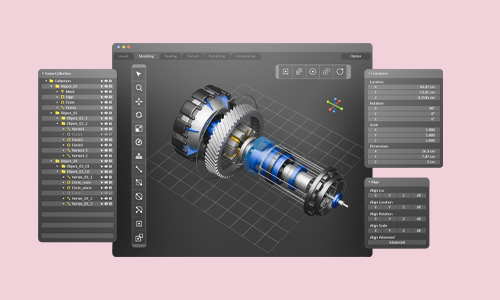
Creating a Component Assembly in Fusion 360
cpdacree aoth ukrlp 24hs fullonline 14days

Get access to 5000+ courses including this for only £49. Learn More.

Overview of Creating a Component Assembly in Fusion 360

Learn how to create precise Component Assembly designs using Fusion 360 and develop practical CAD Assembly skills. This course introduces 3D CAD Design, assembly modelling, and 3D Modelling techniques, helping learners build a strong foundation in modern mechanical and engineering design workflows.

Progress from basic to intermediate and advanced assembly techniques while developing confidence in Assembly Modelling and Mechanical Design. Through structured lessons, you will explore practical Fusion 360 workflows for creating, organising, and managing components within detailed CAD assemblies for effective Product Design.

Designed for learners seeking practical CAD Skills, this course strengthens your understanding of Engineering Design and professional 3D CAD Design principles. From introductory concepts to advanced assembly methods, you will develop valuable skills applicable to mechanical design, product development, and computer-aided design projects.

The course was audited and updated on: 10th August, 2026

Learning Outcomes of Creating a Component Assembly in Fusion 360

Certification

one education Certificate

After completing the Creating a Component Assembly in Fusion 360 course assessment, you will be eligible to receive a CPD-accredited certificate worth £9 from One Education to demonstrate your achievement.

The certificate is also available as a printed hard copy delivered by post for £15.

Why Study This Creating a Component Assembly in Fusion 360 Course?

Fusion 360 provides powerful tools for creating accurate 3D CAD assemblies and managing multiple components within a unified design. This course helps learners explore component assembly, CAD assembly, assembly modelling, 3D CAD design, joints, positioning, and practical workflows for developing functional mechanical assemblies.

Studying component assembly in Fusion 360 can strengthen both technical and engineering design skills. Learners can organise components, create relationships between parts, refine assembly workflows, and develop confidence with 3D modelling for mechanical design, product development, prototyping, manufacturing, and engineering projects.

Course Duration

The Creating a Component Assembly in Fusion 360 course has a total study time of 4 hours, 10 minutes. Learners can progress through the programme at a flexible pace, developing practical skills in Fusion 360, component assembly, CAD assembly, 3D CAD design, assembly modelling, mechanical design, 3D modelling, product design, engineering design, and CAD skills.

Requirements

The Creating a Component Assembly in Fusion 360 course has no formal entry requirements, making it suitable for beginners and aspiring CAD designers. An interest in Fusion 360, component assembly, CAD assembly, 3D CAD design, assembly modelling, and mechanical design is beneficial. Basic computer skills, good English, and reliable internet access are recommended for effective online learning.

Career Path

Frequently Asked Questions

1. What is the Creating a Component Assembly in Fusion 360 course?
The Creating a Component Assembly in Fusion 360 course teaches learners how to create and organise component assemblies using Autodesk Fusion 360. It covers Fusion 360, Component Assembly, CAD Assembly, 3D CAD Design, Assembly Modelling, Mechanical Design, 3D Modelling, Product Design, Engineering Design, and CAD Skills.

2. Who is the Creating a Component Assembly in Fusion 360 course suitable for?
The course is suitable for beginners, CAD designers, engineers, product designers, mechanical design learners, students, makers, and professionals who want to develop practical skills in Component Assembly, CAD Assembly, 3D CAD Design, and Assembly Modelling.

3. What will I learn from the Fusion 360 assembly course?
You will progress through Section 01: Introduction, Section 02: Basic Assembly, and Section 03: Intermediate Assembly. The course develops practical skills in creating, organising, and working with components while building knowledge of CAD Assembly and Assembly Modelling.

4. Do I need previous Fusion 360 experience?
The course includes an Introduction and progresses from Basic Assembly to Intermediate Assembly, providing a structured learning pathway. Some familiarity with 3D Modelling or Fusion 360 can be useful, but the course is designed to develop practical assembly skills progressively.

5. What is Fusion 360?
Fusion 360 is a cloud-connected design and engineering platform used for 3D modelling, CAD design, product development, simulation, manufacturing, and collaboration. It provides tools for developing individual components as well as complete assemblies.

6. What is a component assembly?
A Component Assembly is a collection of individual components arranged and positioned to form a complete product or mechanical system. Each component can have a specific role and relationship within the overall assembly.

Course Curriculum

Section 01: Introduction
Scope of the course 00:02:00
How to download Fusion 360 for FREE 00:04:00
A brief revision of commands 00:13:00
Top down design concept 00:04:00
Bodies Vs Components 00:04:00
How to create joints 00:10:00
A very simple assembly 00:10:00
Section 02: Basic Assembly
Universal Joint 00:21:00
Knuckle Joint 00:21:00
Carden Joint 00:18:00
Plummer block 00:16:00
Geneva Wheel Mechanism 00:21:00
4 Bar Linkage Mechanism 00:15:00
Slider Crank Mechanism 00:17:00
Section 03: Intermediate Assembly
C-Clamp 00:14:00
Pin slot joint 00:05:00
Creating a curved slot 00:10:00
Section 04: Advanced Assembly
The Ball Joint 00:05:00
As Built Joint 00:20:00
Motion Links 00:10:00
Tangent Relationship 00:03:00
Rigid groups 00:03:00
Motion study 00:04:00
Order Your Certificate
Order Your Certificate Now 00:00:00
Creating a Component Assembly in Fusion 360
top
