How to Start a Career in IT Support With No Experience

June 18, 2026 | 17 minutes | 11 Readers

The technology sector continues to expand at a remarkable pace, creating increasing demand for skilled IT support professionals across organisations of every size. For those looking to enter the tech industry, IT support offers one of the most accessible and rewarding career paths. Unlike many specialised technology roles, a career in IT support does not always require extensive qualifications or prior technical experience. Employers often place significant value on practical problem-solving abilities, communication skills, customer service experience, and a willingness

The technology sector continues to expand at a remarkable pace, creating increasing demand for skilled IT support professionals across organisations of every size. For those looking to enter the tech industry, IT support offers one of the most accessible and rewarding career paths. Unlike many specialised technology roles, a career in IT support does not always require extensive qualifications or prior technical experience. Employers often place significant value on practical problem-solving abilities, communication skills, customer service experience, and a willingness to learn.

Whether you are changing careers, entering the workforce for the first time, or simply exploring opportunities in technology, IT support can provide a strong foundation for long-term career growth. With the right approach, complete beginners can develop essential technical skills, gain valuable hands-on experience, and secure their first role in the industry. This guide will walk you through the key steps to starting a successful career in IT support, even if you have no previous experience or technical background.

What Is IT Support and Why Is It a Great Career Choice?

IT support is an essential part of modern organisations, helping users resolve technical issues and ensuring systems run smoothly. IT support professionals assist with:

  • ♦  Troubleshooting hardware problems
  • ♦  Resolving software errors
  • ♦  Setting up devices and user accounts
  • ♦  Managing network and connectivity issues
  • ♦  Providing technical support to employees or customers
  • ♦  Installing and maintaining systems

Why Choose a Career in IT Support?

IT support is one of the most accessible ways to start a career in the technology industry. It offers several advantages, including:

  • ♦  High demand across industries – Businesses of all sizes rely on IT support professionals.
  • ♦  No computer science degree required – Many roles focus on practical skills and technical knowledge.
  • ♦  Remote and hybrid opportunities – Flexible working options are increasingly available.
  • ♦  Clear career progression – Opportunities to move into specialised and senior IT roles.
  • ♦  Strong foundation for advanced careers – IT support provides valuable experience across various technologies.

A Great Starting Point for IT Careers

Many professionals who are now cybersecurity analysts, network engineers, cloud specialists, and IT managers began their careers in IT support. The role helps develop technical expertise, problem-solving abilities, and communication skills, making it an excellent stepping stone to a successful career in IT.

If you’re looking to build your expertise in IT service management and earn a recognised industry qualification, consider enrolling in the ITIL® 4 Specialist: Monitor, Support, and Fulfil Certification Course. This course covers essential practices for service monitoring, user support, incident management, and service fulfilment, helping you prepare for certification and enhance your professional capabilities. Start your learning journey today with One Education.

Do You Really Need Experience to Get Started

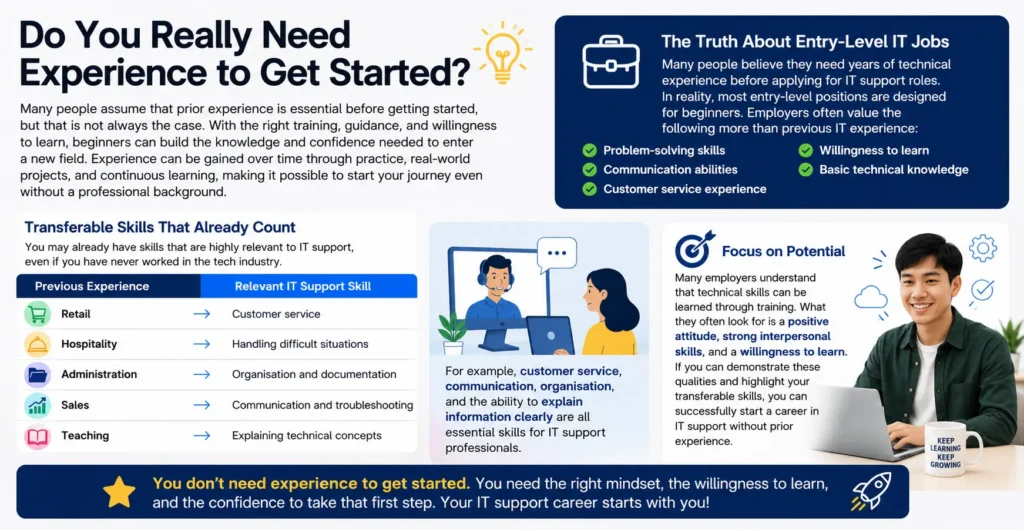
Do You Really Need Experience to Get Started?

Many people assume that prior experience is essential before getting started, but that is not always the case. With the right training, guidance, and willingness to learn, beginners can build the knowledge and confidence needed to enter a new field. Experience can be gained over time through practice, real-world projects, and continuous learning, making it possible to start your journey even without a professional background.

The Truth About Entry-Level IT Jobs

Many people believe they need years of technical experience before applying for IT support roles. In reality, most entry-level positions are designed for beginners. Employers often value the following more than previous IT experience:

  • ♦  Problem-solving skills
  • ♦  Communication abilities
  • ♦  Customer service experience
  • ♦  Willingness to learn
  • ♦  Basic technical knowledge

Transferable Skills That Already Count

You may already have skills that are highly relevant to IT support, even if you have never worked in the tech industry.

Previous Experience Relevant IT Support Skill
Retail Customer service
Hospitality Handling difficult situations
Administration Organisation and documentation
Sales Communication and troubleshooting
Teaching Explaining technical concepts

For example, customer service, communication, organisation, and the ability to explain information clearly are all essential skills for IT support professionals.

Focus on Potential

Many employers understand that technical skills can be learned through training. What they often look for is a positive attitude, strong interpersonal skills, and a willingness to learn. If you can demonstrate these qualities and highlight your transferable skills, you can successfully start a career in IT support without prior experience.

Learn the Core IT Support Skills Employers Want

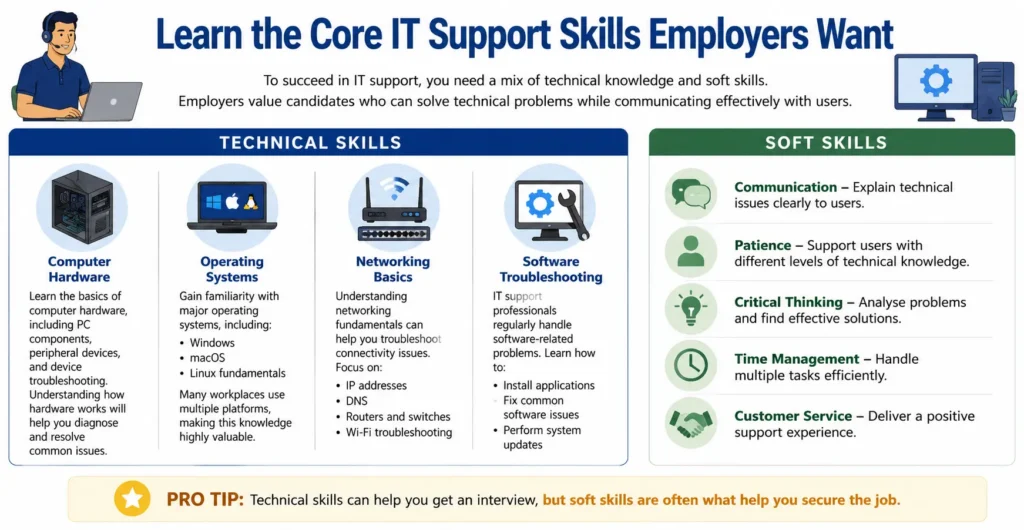
Learn the Core IT Support Skills Employers Want

To succeed in IT support, you need a mix of technical knowledge and soft skills. Employers value candidates who can solve technical problems while communicating effectively with users.

Technical Skills

Computer Hardware

Learn the basics of computer hardware, including PC components, peripheral devices, and device troubleshooting. Understanding how hardware works will help you diagnose and resolve common issues.

Operating Systems

Gain familiarity with major operating systems, including:

  • ♦  Windows

  • ♦  macOS

  • ♦  Linux fundamentals

Many workplaces use multiple platforms, making this knowledge highly valuable.

Networking Basics

Understanding networking fundamentals can help you troubleshoot connectivity issues. Focus on:

  • ♦  IP addresses

  • ♦  DNS

  • ♦  Routers and switches

  • ♦  Wi-Fi troubleshooting

Software Troubleshooting

IT support professionals regularly handle software-related problems. Learn how to:

  • ♦  Install applications

  • ♦  Fix common software issues

  • ♦  Perform system updates

Soft Skills

Technical skills are important, but employers also look for strong interpersonal abilities.

  • ♦  Communication – Explain technical issues clearly to users.
  • ♦  Patience – Support users with different levels of technical knowledge.
  • ♦  Critical Thinking – Analyse problems and find effective solutions.
  • ♦  Time Management – Handle multiple tasks efficiently.
  • ♦  Customer Service – Deliver a positive support experience.

Pro Tip: Technical skills can help you get an interview, but soft skills are often what help you secure the job.

Build Experience Without Having a Job

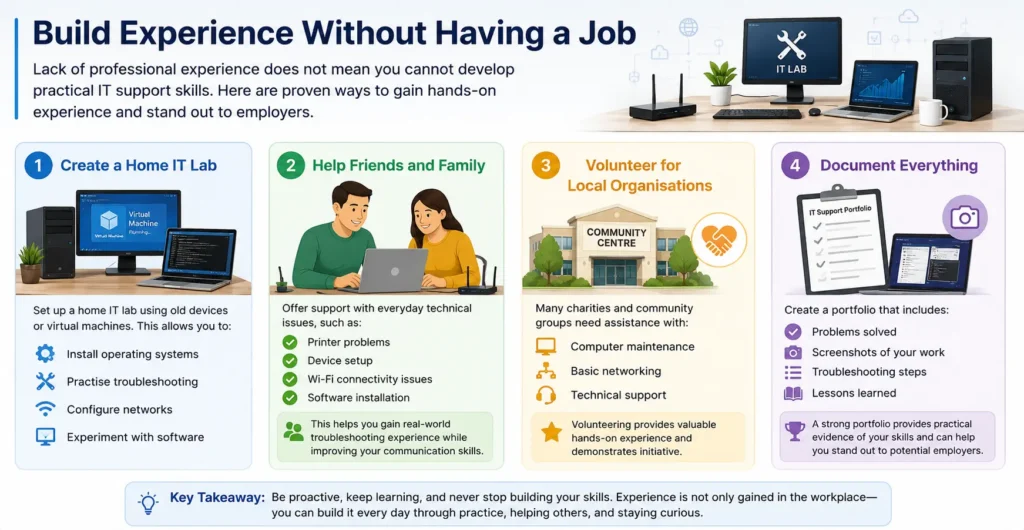
Build Experience Without Having a Job

Lack of professional experience does not mean you cannot develop practical IT support skills. There are several ways to gain hands-on experience and demonstrate your abilities to employers.

Create a Home IT Lab

Set up a home IT lab using old devices or virtual machines. This allows you to:

  • ♦  Install operating systems
  • ♦  Practise troubleshooting
  • ♦  Configure networks
  • ♦  Experiment with software

Help Friends and Family

Offer support with everyday technical issues, such as:

  • ♦  Printer problems
  • ♦  Device setup
  • ♦  Wi-Fi connectivity issues
  • ♦  Software installation

This helps you gain real-world troubleshooting experience while improving your communication skills.

Volunteer for Local Organisations

Many charities and community groups need assistance with:

  • ♦  Computer maintenance
  • ♦  Basic networking
  • ♦  Technical support

Volunteering provides valuable hands-on experience and demonstrates initiative.

Document Everything

Create a portfolio that includes:

  • ♦  Problems solved
  • ♦  Screenshots of your work
  • ♦  Troubleshooting steps
  • ♦  Lessons learned

A strong portfolio provides practical evidence of your skills and can help you stand out to potential employers.

Earn Beginner-Friendly IT Certifications

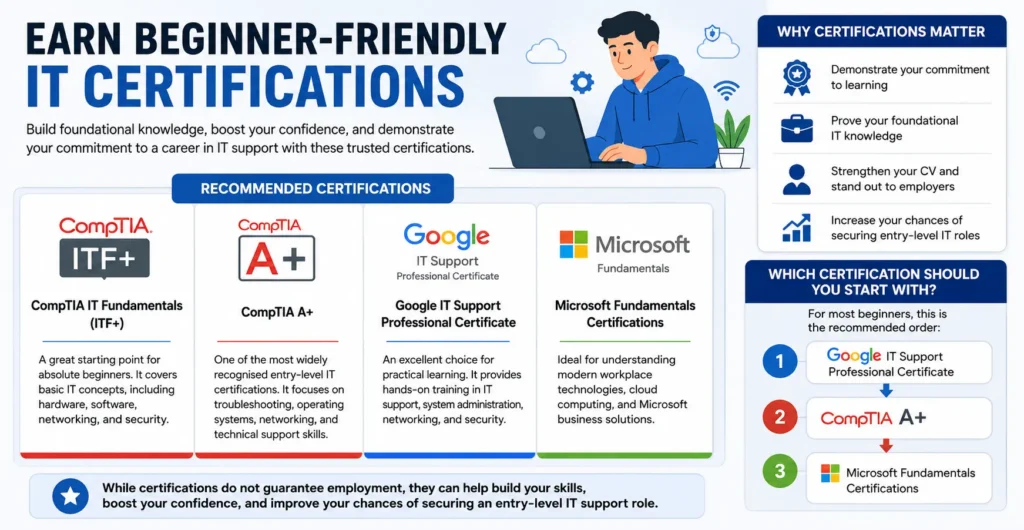
Earn Beginner-Friendly IT Certifications

Earning beginner-friendly IT certifications is a great way to build foundational knowledge and demonstrate your commitment to starting a career in IT support. Popular options include the Google IT Support Professional Certificate, CompTIA A+, and Microsoft Fundamentals certifications, all of which cover essential technical skills valued by employers. These certifications can strengthen your CV, boost your confidence, and help you stand out when applying for entry-level IT roles.

Why Certifications Matter

Certifications demonstrate your commitment to learning and help prove your foundational IT knowledge. They can strengthen your CV and make you more attractive to employers, especially when you have little or no professional experience.

Recommended Certifications

CompTIA IT Fundamentals (ITF+)

A great starting point for absolute beginners. It covers basic IT concepts, including hardware, software, networking, and security.

CompTIA A+

One of the most widely recognised entry-level IT certifications. It focuses on troubleshooting, operating systems, networking, and technical support skills.

Google IT Support Professional Certificate

An excellent choice for practical learning. It provides hands-on training in IT support, system administration, networking, and security.

Microsoft Fundamentals Certifications

Ideal for understanding modern workplace technologies, cloud computing, and Microsoft business solutions.

Which Certification Should You Start With?

For most beginners, this is the recommended order:

  1. 1. Google IT Support Professional Certificate
  2. 2. CompTIA A+
  3. 3. Microsoft Fundamentals Certifications

While certifications do not guarantee employment, they can help build your skills, boost your confidence, and improve your chances of securing an entry-level IT support role.

Create a Beginner-Friendly IT Support CV

Create a Beginner-Friendly IT Support CV

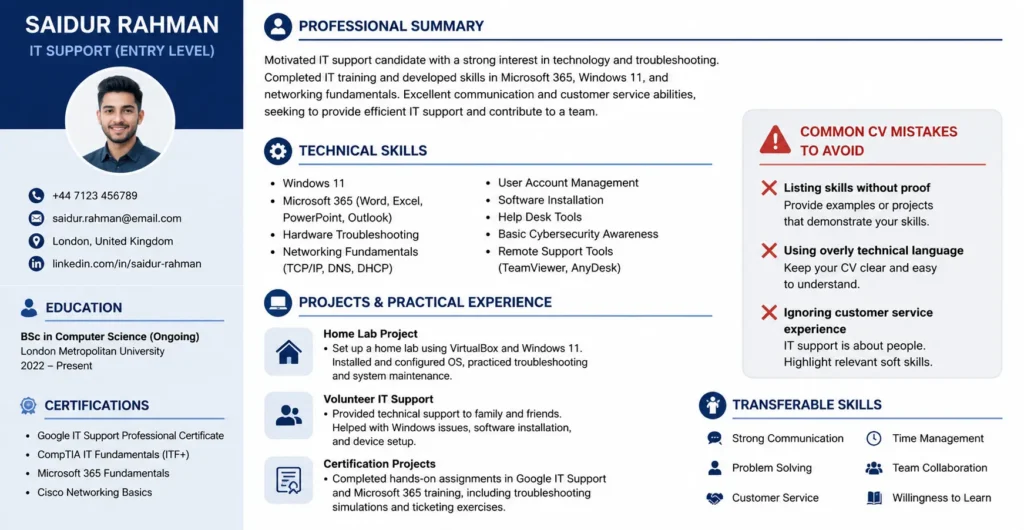
A well-written IT support CV can help you secure entry-level opportunities, even without professional experience. Focus on demonstrating your technical knowledge, practical projects, and transferable skills.

Professional Summary

Use a short summary to highlight:

  • ♦  Passion for technology
  • ♦  Relevant IT training or certifications
  • ♦  Transferable skills such as communication and problem-solving

Example:

“Motivated IT support candidate with a strong interest in technology and troubleshooting. Completed IT training and developed skills in Microsoft 365, Windows 11, and networking fundamentals. Excellent communication and customer service abilities.”

Technical Skills

Include relevant beginner-level IT skills, such as:

  • ♦  Windows 11
  • ♦  Microsoft 365
  • ♦  Hardware troubleshooting
  • ♦  Networking fundamentals

Projects Section

Show practical experience through:

  • ♦  Home lab projects – Installing operating systems and troubleshooting devices
  • ♦  Volunteer work – Helping others with technical issues
  • ♦  Certification projects – Completing hands-on IT assignments and exercises

Common CV Mistakes to Avoid

❌ Listing skills without proof
❌ Using overly technical language
❌ Ignoring customer service experience

Where to Find Your First IT Support Job

Where to Find Your First IT Support Job

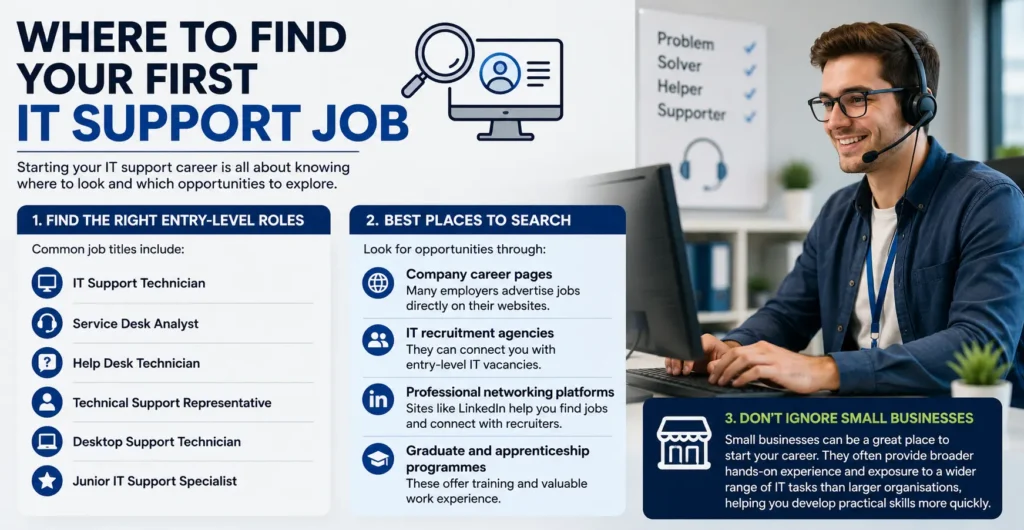
Finding your first IT support job starts with searching for the right entry-level roles. Common job titles include:

  • ♦  IT Support Technician
  • ♦  Service Desk Analyst
  • ♦  Help Desk Technician
  • ♦  Technical Support Representative
  • ♦  Desktop Support Technician
  • ♦  Junior IT Support Specialist

Best Places to Search

Look for opportunities through:

  • ♦  Company career pages – Many employers advertise jobs directly on their websites.
  • ♦  IT recruitment agencies – They can connect you with entry-level IT vacancies.
  • ♦  Professional networking platforms – Sites like LinkedIn help you find jobs and connect with recruiters.
  • ♦  Graduate and apprenticeship programmes – These offer training and valuable work experience.

Don't Ignore Small Businesses

Small businesses can be a great place to start your career. They often provide broader hands-on experience and exposure to a wider range of IT tasks than larger organisations, helping you develop practical skills more quickly.

How to Prepare for an IT Support Interview

How to Prepare for an IT Support Interview

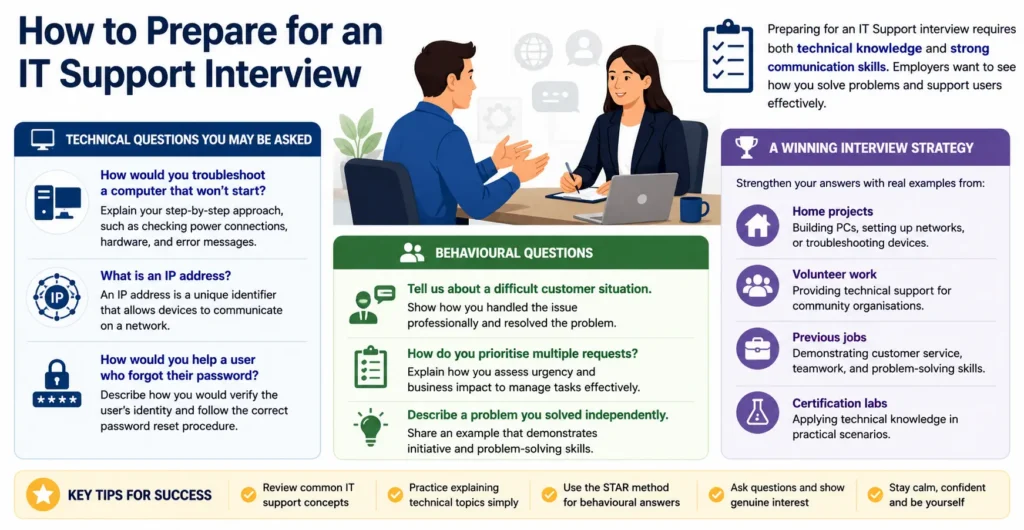
Preparing for an IT Support interview requires both technical knowledge and strong communication skills. Employers want to see how you solve problems and support users effectively.

Technical Questions You May Be Asked

Common technical questions include:

  • ♦  How would you troubleshoot a computer that won’t start?
    Explain your step-by-step approach, such as checking power connections, hardware, and error messages.
  • ♦  What is an IP address?
    An IP address is a unique identifier that allows devices to communicate on a network.
  • ♦  How would you help a user who forgot their password?
    Describe how you would verify the user’s identity and follow the correct password reset procedure.

Behavioural Questions

You may also be asked about your workplace skills:

  • ♦  Tell us about a difficult customer situation.
    Show how you handled the issue professionally and resolved the problem.
  • ♦  How do you prioritise multiple requests?
    Explain how you assess urgency and business impact to manage tasks effectively.
  • ♦  Describe a problem you solved independently.
    Share an example that demonstrates initiative and problem-solving skills.

A Winning Interview Strategy

Strengthen your answers with real examples from:

  • ♦  Home projects – Building PCs, setting up networks, or troubleshooting devices.
  • ♦  Volunteer work – Providing technical support for community organisations.
  • ♦  Previous jobs – Demonstrating customer service, teamwork, and problem-solving skills.
  • ♦  Certification labs – Applying technical knowledge in practical scenarios.

Using real experiences helps you demonstrate both your technical abilities and your readiness for an IT Support role.

Career Progression After IT Support

Career Progression After IT Support

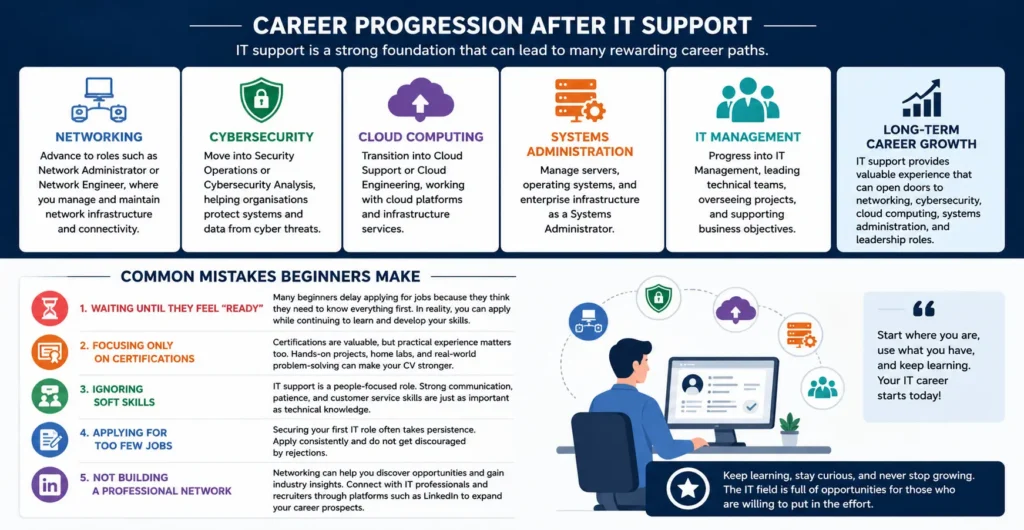
One of the main benefits of starting in IT support is the variety of career paths available. The technical and problem-solving skills gained in this role provide a strong foundation for progressing into specialised IT positions.

Networking

Advance to roles such as Network Administrator or Network Engineer, where you manage and maintain network infrastructure and connectivity.

Cybersecurity

Move into Security Operations or Cybersecurity Analysis, helping organisations protect systems and data from cyber threats.

Cloud Computing

Transition into Cloud Support or Cloud Engineering, working with cloud platforms and infrastructure services.

Systems Administration

Manage servers, operating systems, and enterprise infrastructure as a Systems Administrator.

IT Management

Progress into IT Management, leading technical teams, overseeing projects, and supporting business objectives.

Long-Term Career Growth

IT support provides valuable experience that can open doors to networking, cybersecurity, cloud computing, systems administration, and leadership roles, making it an excellent starting point for a long-term IT career.

Common Mistakes Beginners Make

Waiting Until They Feel “Ready”

Many beginners delay applying for jobs because they think they need to know everything first. In reality, you can apply while continuing to learn and develop your skills.

Focusing Only on Certifications

Certifications are valuable, but practical experience matters too. Hands-on projects, home labs, and real-world problem-solving can make your CV stronger.

Ignoring Soft Skills

IT support is a people-focused role. Strong communication, patience, and customer service skills are just as important as technical knowledge.

Applying for Too Few Jobs

Securing your first IT role often takes persistence. Apply consistently and do not get discouraged by rejections.

Not Building a Professional Network

Networking can help you discover opportunities and gain industry insights. Connect with IT professionals and recruiters through platforms such as LinkedIn to expand your career prospects.

Conclusion

Starting a career in IT support with no experience may seem challenging, but it is entirely achievable with the right approach. By building a strong foundation in basic IT concepts, developing practical skills through hands-on practice, earning relevant certifications, and creating a professional CV, you can position yourself as a strong candidate for entry-level roles. Continuous learning, networking with industry professionals, and staying updated with emerging technologies will further enhance your career prospects. With dedication, persistence, and a willingness to learn, IT support can serve as an excellent gateway to a rewarding and long-term career in the technology industry.

FAQs — How to Start a Career in IT Support With No Experience

1. Can I start a career in IT support without any experience?

Yes. Many entry-level IT support roles do not require previous work experience. Employers often value problem-solving skills, willingness to learn, and basic technical knowledge.

2. What qualifications do I need to work in IT support?

Formal qualifications are not always required. However, IT support courses, certifications, and practical knowledge of computer systems can help you stand out to employers.

3. Which skills are important for IT support jobs?

Key skills include troubleshooting, communication, customer service, problem-solving, hardware and software knowledge, and basic networking skills.

4. How can I gain IT support experience without a job?

You can build experience by setting up home labs, volunteering, completing online projects, helping friends and family with technical issues, or taking practical training courses.

5. Are IT support certifications worth it?

Yes. Certifications can demonstrate your knowledge and commitment to employers, especially when you have little or no professional experience.

Sam Walker

Article by

Sam Walker

Sam Walker is an education specialist and author at One Education, bringing over 4 years of experience in creating practical resources and strategies to support teachers and enhance student learning.

top
Home Courses Search